
共計 6247 個字符,預(yù)計需要花費 16 分鐘才能閱讀完成。
這篇文章主要介紹 Linux 與網(wǎng)絡(luò)設(shè)備 GRE 如何配置,文中介紹的非常詳細(xì),具有一定的參考價值,感興趣的小伙伴們一定要看完!
GRE 介紹及應(yīng)用場景
GRE(General Routing Encapsulation),即通用路由封裝,是一種三層技術(shù)。它的最大作用是可以對某些網(wǎng)絡(luò)層協(xié)議的報文進(jìn)行封裝,如對路由協(xié)議、語音、視頻等組播報文或 IPv6 報文進(jìn)行封裝。同時,也能夠與 IPSec 結(jié)合,解決 GRE 的安全問題。
GRE 報文
如下圖所示,GRE 是按照 TCPIP 協(xié)議棧進(jìn)行逐層封裝,新的 IP 頭會封裝在原有的 IP 頭中,然后運送出去,封裝操作是通過 Tunnel 接口完成的,GRE 協(xié)議經(jīng)過 Tunnel 口時,會將接口的封裝協(xié)議設(shè)置為 GRE 協(xié)議。
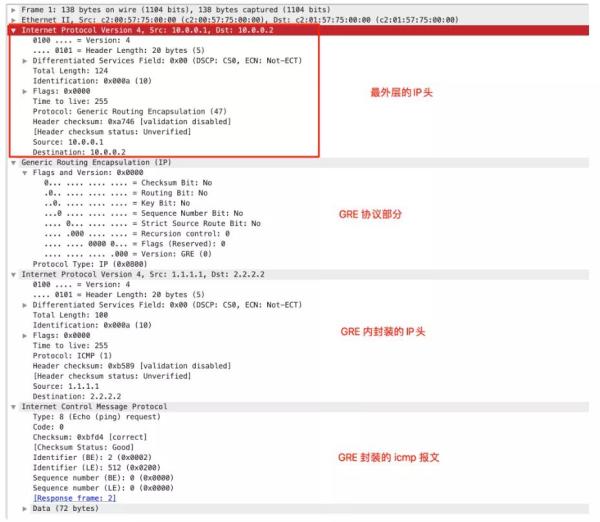
GRE 的配置場景
CentOS 7.6 與 華為防火墻建立 GRE 隧道
拓?fù)鋱D
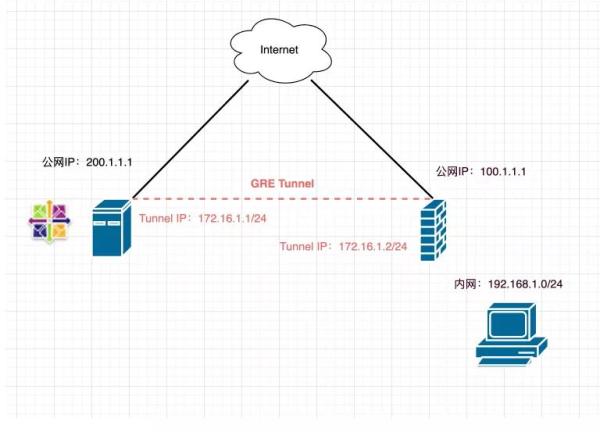
實現(xiàn)目標(biāo)
CentOS 與 華為防火墻建立 GRE 隧道;
華為防火墻背后的內(nèi)網(wǎng)網(wǎng)段 192.168.1.0/24 通過 GRE 隧道從 CentOS 到 Internet;
CentOS 配置端口映射,將 192.168.1.10 的 8080 端口映射到 CentOS 的公網(wǎng)地址 200.1.1.1 的 8080 端口。
配置
CentOS
配置接口與路由
[root@CentOS ~]# vim /etc/sysconfig/network-scripts/ifcfg-tun0 DEVICE=tun0 BOOTPROTO=none ONBOOT=yes DEVICETYPE=tunnel TYPE=GRE PEER_INNER_IPADDR=172.16.1.2 PEER_OUTER_IPADDR=100.1.1.1 MY_INNER_IPADDR=172.16.1.1 MY_OUTER_IPADDR=200.1.1.1 [root@CentOS ~]# vim /etc/sysconfig/network-scripts/route-tun0 192.168.1.0/24 via 172.16.1.2 [root@CentOS ~]# ifup tun0Iptables 配置
# 安裝 iptables 管理服務(wù) [root@CentOS ~]# yum install iptables-services # 在 INPUT 方向要放行對端的公網(wǎng)地址 [root@CentOS ~]# iptables -I INPUT -s 100.1.1.1/32 -j ACCEPT # 配置源地址轉(zhuǎn)換 [root@CentOS ~]# iptables -t nat -A POSTROUTING -s 192.168.1.0/24 -j SNAT --to-source 200.1.1.1 # 端口映射 [root@CentOS ~]# iptables -t nat -A PREROUTING -d 200.1.1.1 -p tcp --dport 8080 -j DNAT --to-dest 192.168.1.10:8080 # 保存 iptables [root@CentOS ~]# service iptables save開啟 ipv4 轉(zhuǎn)發(fā)
[root@CentOS ~]# echo net.ipv4.ip_forward = 1 /etc/sysctl.conf [root@CentOS ~]# sysctl -p華為防火墻
本次以華為 USG6300E 系列防火墻為例:
配置接口,并添加到安全區(qū)域
interface Tunnel0 ip address 172.16.1.2 255.255.255.0 tunnel-protocol gre source 100.1.1.1 destination 200.1.1.1 # 將接口添加到安全區(qū)域內(nèi) [USG6300E] firewall zone tunnel firewall zone name tunnel set priority 75 add interface Tunnel0配置安全策略
在實際的實施中,可以將策略收緊一些,根據(jù)需求限制源和目的地址。
如果條件允許的話,可以先將默認(rèn)安全策略設(shè)置為 permit,待調(diào)通之后,再修改安全策略:
security-policy rule name tunnel_out source-zone trust destination-zone tunnel action permit rule name tunnel_in source-zone tunnel destination-zone trust action permit # 放行 tunnel 到 untrust 的流量 rule name tunnel_untrust source-zone tunnel destination-zone untrust action permit配置策略路由
[USG6300E]policy-based-route # policy-based-route rule name PBR source-zone trust source-address 192.168.1.0 mask 255.255.255.0 action pbr egress-interface Tunnel0配置 No-NAT
設(shè)置去往隧道的流量不使用源地址轉(zhuǎn)換:
[USG6300E-policy-nat]dis th nat-policy rule name SNAT source-zone tunnel destination-zone untrust source-address 192.168.1.0 mask 255.255.255.0 action no-nat驗證
主要有如下幾個測試方法:
鴻蒙官方戰(zhàn)略合作共建——HarmonyOS 技術(shù)社區(qū)
在 CentOS 或 防火墻 ping 對端的隧道地址;
使用 192.168.1.0/24 網(wǎng)段內(nèi)的設(shè)備 traceroute 公網(wǎng)地址,查看經(jīng)過的路徑以確認(rèn)是否經(jīng)過隧道轉(zhuǎn)發(fā)。
Ubuntu 18 與 華為路由器建立 GRE 隧道
拓?fù)鋱D

實現(xiàn)目標(biāo)
Ubuntu 18 與華為路由器建立 GRE 隧道;
華為防火墻背后的內(nèi)網(wǎng)網(wǎng)段 192.168.1.0/24 通過 GRE 隧道從 CentOS 到 Internet;
Ubuntu 配置端口映射,將 192.168.1.10 的 8080 端口映射到 CentOS 的公網(wǎng)地址 200.1.1.1 的 8080 端口。
配置
Ubuntu
netplan 配置
root@ubunt18demo:~# vim /etc/netplan/00-installer-config.yaml network: ethernets: ens3: addresses: - 200.1.1.1/24 gateway4: 200.1.1.254 nameservers: addresses: - 114.114.114.114 tunnels: tun0: mode: gre local: 200.1.1.1 remote: 100.1.1.1 addresses: [ 172.16.1.1/24 ] routes: - to: 192.168.1.0/24 via: 172.16.1.2 # 可以先執(zhí)行 netplan try 驗證一下,如果沒有斷掉的話可以按 ENTER 確認(rèn)配置 # 如果和主機(jī) SSH 中斷,可以等待 120S 會自動恢復(fù) root@ubunt18demo:~# netplay tryiptables 設(shè)置
Ufw 是 Ubuntu 的防火墻配置工具,底層還是調(diào)用 iptables 處理的:
# 啟用 ufw ufw enable # 放行 SSH ufw allow ssh # 放行 GRE 對端進(jìn)入的流量 ufw allow from 100.1.1.1/32 # 配置 nat 映射 iptables -t nat -A POSTROUTING -s 192.168.1.0/24 -j SNAT --to-source 200.1.1.1 iptables -t nat -A PREROUTING -d 200.1.1.1 -p tcp --dport 8080 -j DNAT --to-dest 192.168.1.10:8080 # 將 ufw 設(shè)置為開機(jī)自啟動 systemctl enable ufw開啟 ipv4 轉(zhuǎn)發(fā):
echo net.ipv4.ip_forward = 1 /etc/sysctl.conf sysctl -p華為路由器
以 AR1200 系列路由器為例:
配置接口
interface Tunnel0/0/1 ip address 172.16.1.2 255.255.255.0 tunnel-protocol gre source 100.1.1.1 destination 200.1.1.1配置策略路由
# 配置 ACL [AR1200] acl number 3000 [AR1200-acl-adv-3000] rule 10 permit ip destination 192.168.1.0 0.0.0.255 # 配置流分類 [AR1200] traffic classifier togretunnel [AR1200-classifier-togretunnel] if-match acl 3000 # 配置流行為 [AR1200] traffic behavior togretunnel [AR1200-behavior-togretunnel] redirect ip-nexthop 172.16.1.1 # 配置流策略 [AR1200] traffic policy togretunnel [AR1200-trafficpolicy-vlan10] classifier togretunnel behavior togretunnel # 在內(nèi)網(wǎng)口調(diào)用流策略 [AR1200] interface gigabitethernet 1/0/1 [AR1200-GigabitEthernet3/0/0] traffic-policy togretunnel inbound驗證
驗證方法同 CentOS 與 華為防火墻建立 GRE 隧道一致。
Juniper SRX 防火墻的 GRE 配置
SRX 防火墻的出接口如果使用了 route-instances,那么配置 tunnel 口時,一定要注意增加 route-instance destination,如下所示:
set interfaces gr-0/0/0 unit 0 tunnel source 100.1.1.1 set interfaces gr-0/0/0 unit 0 tunnel destination 200.1.1.1 set interfaces gr-0/0/0 unit 0 tunnel routing-instance destination EXAMPLE-INSTANCE set interfaces gr-0/0/0 unit 0 family inet address 172.16.1.2/24另外策略路由在 SRX 中稱為 FBF,還有 No-NAT 的配置示例如下:
# 配置 firewall filter,匹配需要進(jìn)入隧道的流量 set firewall filter to-GreTunnel term 1 from source-address 192.168.1.0/24 set firewall filter to-GreTunnel term 1 then routing-instance EXAMPLE-INSTANCE set firewall filter to-GreTunnel term 3 then accept set routing-options rib-groups global import-rib EXAMPLE-INSTANCE.inet.0 # 配置去往 Gre Tunnel 的路由 set routing-instances EXAMPLE-INSTANCE instance-type forwarding set routing-instances EXAMPLE-INSTANCE routing-options interface-routes rib-group inet global set routing-instances EXAMPLE-INSTANCE routing-options static route 0.0.0.0/0 next-hop 172.16.1.1 # 在內(nèi)網(wǎng)口調(diào)用 firewall filter set interfaces reth3 unit 0 family inet filter input to-GreTunnel # 去往隧道口的流量不做 SNAT set security nat source rule-set Gre-snat from zone Trust set security nat source rule-set Gre-snat to zone EXAMPLE-INSTANCE set security nat source rule-set Gre-snat rule to-cn2-no-nat match source-address 192.168.1.0/24 set security nat source rule-set Gre-snat rule to-cn2-no-nat match destination-address 0.0.0.0/0 set security nat source rule-set Gre-snat rule to-cn2-no-nat then source-nat offCentOS 的策略路由
如果有使用 Linux 作為中轉(zhuǎn)的場景,也就是說華為防火墻和 Linux 建立 GRE 隧道,Linux 又和其他設(shè)備建立,由 Linux 做中轉(zhuǎn)流量,這種場景下,可以在 Linux 配置策略路由,如下所示:
# 臨時配置,重啟后會消失,可以作為調(diào)試使用 ip rule add from 192.168.1.0/24 table 100 pref 10 ip route add 0.0.0.0/0 via 200.1.1.254 table 100 # 將配置持久化 vim /etc/sysconfig/network-scripts/rule-eth0 from 192.168.1.0/24 table 100 pref 10 vim /etc/sysconfig/network-scripts/route-eth0 default via 172.16.1.1 dev tun0 # 驗證命令 ip rule show ip route show table 100以上是“Linux 與網(wǎng)絡(luò)設(shè)備 GRE 如何配置”這篇文章的所有內(nèi)容,感謝各位的閱讀!希望分享的內(nèi)容對大家有幫助,更多相關(guān)知識,歡迎關(guān)注丸趣 TV 行業(yè)資訊頻道!


